S23Tilt switch + LED
Magic Cup
Tilt it and the light fades on and off.
Loading 3D
Drag to orbit · scroll to zoom · double-click to reset
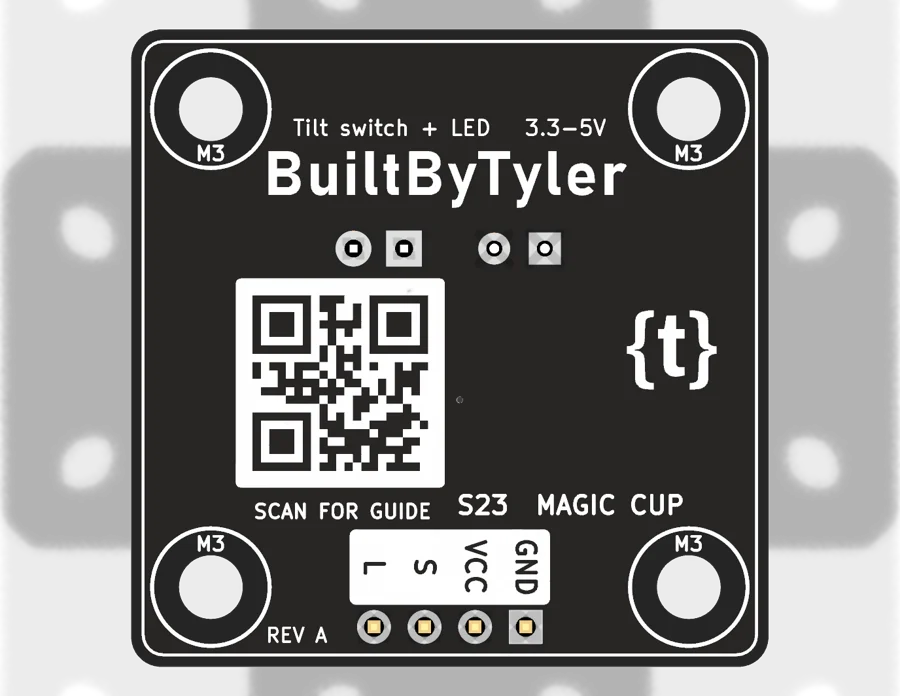
Scan the back of the board to open this page.builtbytyler.com/S23
Try it
Tilt to 'pour' the light
S=1 L=255S=0 fadingS=0 L=0S=1 L=255
Use two: 'pour' the light from one cup to the other by tilting. S = tilt state, L = PWM the LED.
/*
  BuiltByTyler Sensor Kit - S23 MAGIC CUP (Tilt switch + LED)
  Board: ESP32-WROOM-32 DevKit V1 (30-pin), Arduino-ESP32 core 3.x, "ESP32 Dev Module"

  One 'magic cup': upright, the LED fades up; tipped over, it fades out.
  S = tilt switch (HIGH upright), L = LED (PWM). With two cups, wire the
  second to other pins and fade one up while the other fades down.

  Wiring (module pin -> ESP32 pin):
    GND  -> GND
    VCC  -> 3V3
    S    -> GPIO 4
    L    -> GPIO 18

  Library: none needed
  Serial Monitor: 115200 baud
*/

#define S_PIN    4
#define L_PIN    18

int level = 0;   // LED brightness 0..255

void setup() {
  Serial.begin(115200);
  pinMode(S_PIN, INPUT);   // pull-down on the board
}

void loop() {
  int s = digitalRead(S_PIN);
  if (s == HIGH && level < 255) level += 5;   // upright: pour the light in
  if (s == LOW && level > 0)    level -= 5;   // tipped: pour it out
  analogWrite(L_PIN, level);                  // PWM: 0 = off, 255 = full
  static unsigned long lastPrint = 0;
  if (millis() - lastPrint > 250) {
    Serial.printf("S=%d  L=%d\n", s, level);
    lastPrint = millis();
  }
  delay(20);
}Not for sale yet. Planned price $79, shipping included. Join the waitlist and we'll email you once when the kit is ready. Nothing else.